> ## Documentation Index
> Fetch the complete documentation index at: https://docs.dittofeed.com/llms.txt
> Use this file to discover all available pages before exploring further.
# Webhook Template Editor
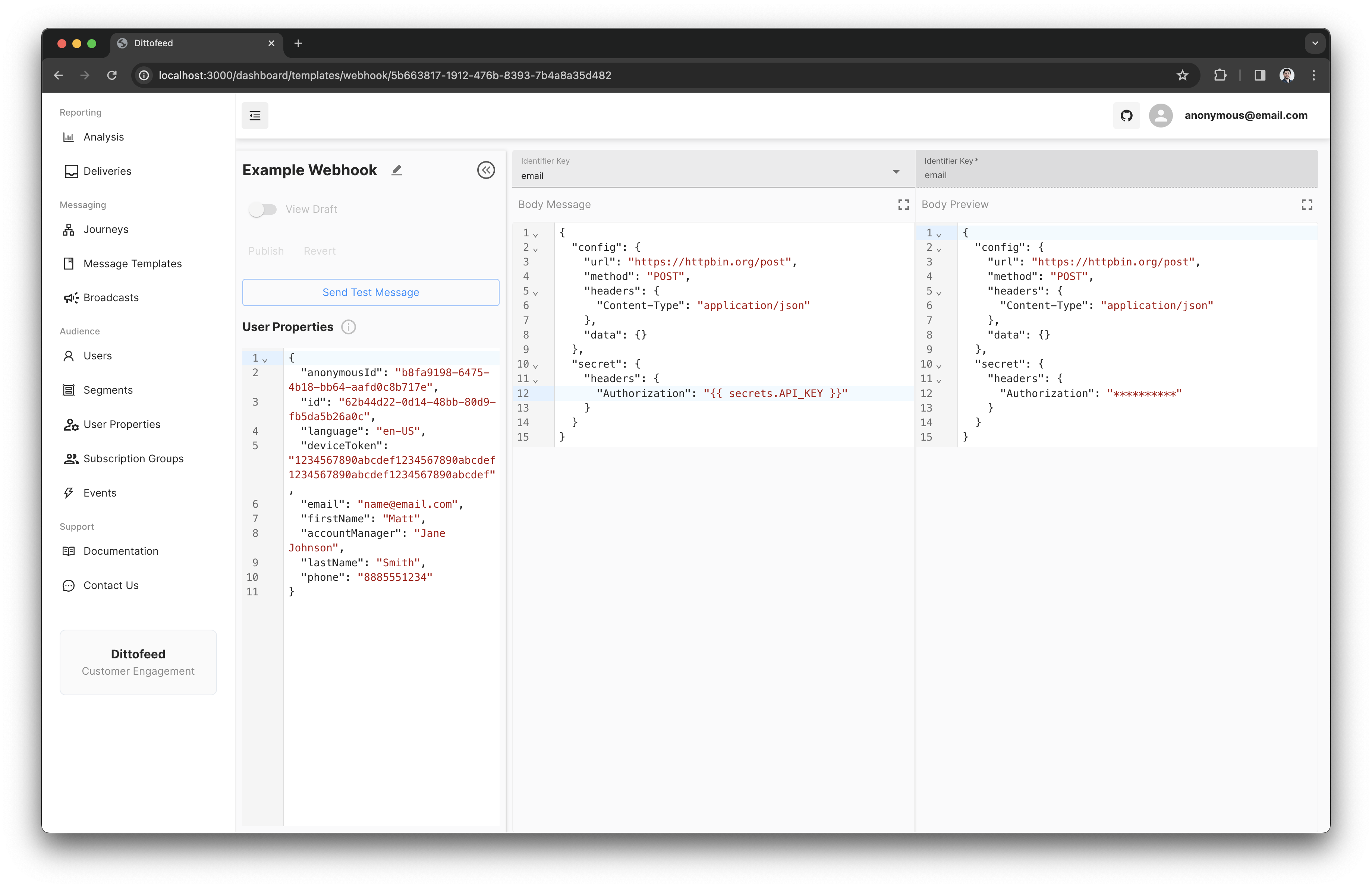
Dittofeed provides a Webhook template editor for rendering webhook request configurations.
## Configuration
```json theme={null}
{
"config": {...},
"secret": {...}
}
```
The `config` object and `secret` object accept the same values, modeled after [axios](https://www.npmjs.com/package/axios) [request configuration](https://axios-http.com/docs/req_config).
| Parameter | Example | Description |
| -------------- | ------------------------------------- | ----------------------------------------------------------------- |
| `url` | `"https://api.com/users"` | `url` is the server URL that will be used for the request |
| `method` | `"POST"` | `method` is the request method to be used when making the request |
| `headers` | `{ "Authorization": "Basic abc123" }` | `headers` are custom headers to be sent |
| `params` | `{ "id": 123 }` | `params` are the URL parameters to be sent with the request |
| `data` | `{ "firstName": "fred" }` | `data` is the data to be sent as the request body |
| `responseType` | `"json"` | Allowed options are "json" and "text" |
The difference between `config` and `seceret` is that the `secret` values:
1. Override the config values.
2. Are not rendered into the stored `DFInternalMessageSent` events, ensuring that sensitive information is not leaked to Dittofeed's event store.
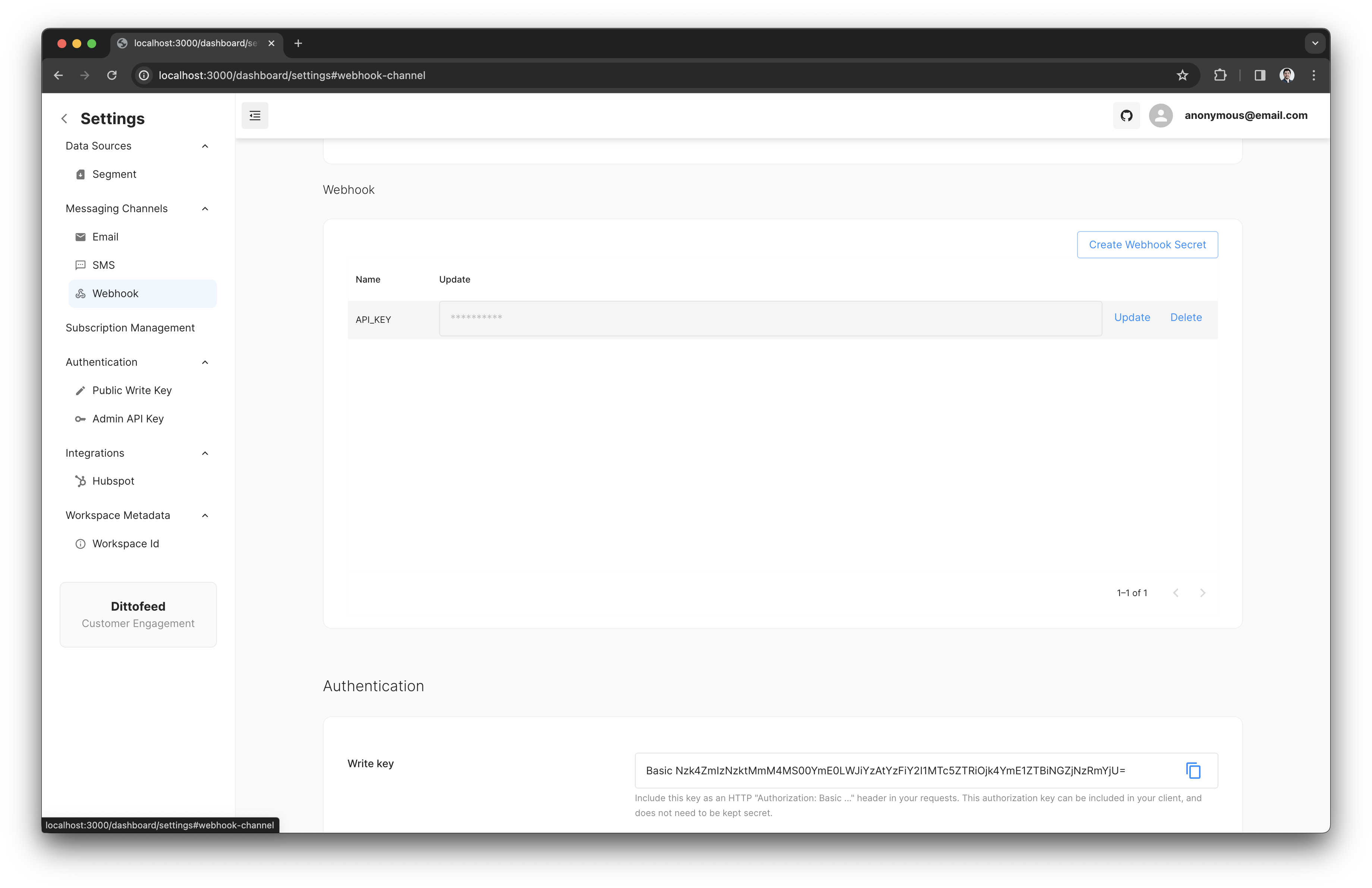
These features of the secret object are useful for storing sensitive information, such as API keys. API keys for the webhook channel can be set on the settings page, at [`/dashboard/settings#webhook-channel`](https://app.dittofeed.com/dashboard/settings#webhook-channel).
## Identifier Key
The webhook template editor also allows you to configure an identifier key. This key serves several purposes, including managing subscriptions, handling webhook based delivery updates, and more.
This value should be the user property which identifies the user with respect to the channel you are contacting them on e.g. the users email, their phone number, or their device token in the case of mobile push.
## Tags
When sending a message rendered from a webhook template, the message can include tags. These tags include metadata about the context in which the template was rendered, and message was sent. Rendering tags into webhook templates can be useful for reporting and attribution purposes.
```json theme={null}
{
"config": {
"url": "https://httpbin.org/post",
"method": "POST",
"headers": {
"Content-Type": "application/json"
},
"data": {
"tagValues": {
"workspaceId": "{{ tags.workspaceId }}",
"runId": "{{ tags.runId }}",
"messageId": "{{ tags.messageId }}",
"userId": "{{ tags.userId }}",
"templateId": "{{ tags.templateId }}",
"nodeId": "{{ tags.nodeId }}",
"journeyId": "{{ tags.journeyId }}"
}
}
}
}
```
| Tag Name | Description |
| ----------- | ------------------------------------------------------------------------------- |
| workspaceId | The unique identifier for the workspace. |
| runId | The identifier for the specific run or execution of a journey. |
| messageId | The identifier for the individual message. |
| userId | The identifier for the user receiving the message. |
| templateId | The identifier for the template used to send the webhook. |
| nodeId | The identifier for the node within the journey from which the message was sent. |
| journeyId | The identifier for the journey within which the message was sent. |
## Example Use case - Render Product Recommendations
Imagine that you want to email users with a list of their top 5 most highly recommended products. Let's say you have an API that returns product recommendations for a user. It would be infeasible to eagerly update Dittofeed every time any user's recommended products change.
Instead, we can use a webhook request to your recommendations API, and use the response to render an email.
See the documentation on the [Synchronize Properties](/resources/journey-nodes/message#webhook-synchronize-properties) journey message node configuration option for more information.
## Webhook Implementation Walkthrough Videos
### Slack
```json theme={null}
{
"config": {
"url": "https://slack.com/api/chat.postMessage",
"method": "POST",
"headers": {
"Content-Type": "application/json"
},
"data": {
"text": "Hello world",
"channel": "alert-testing"
}
},
"secret": {
"headers": {
"Authorization": "Bearer {{secrets.SLACK_BOT_TOKEN}}"
}
}
}
```
### WhatsApp
```json theme={null}
{
"config": {
"url": "https://graph.facebook.com/v19.0/{INSERT YOUR WHATSAPP PHONE NUMBER ID}/messages",
"method": "POST",
"headers": {
"Content-Type": "application/json"
},
"data": {
"messaging_product": "whatsapp",
"to": "{{user.phone}}",
"type": "text",
"text": {
"body": "Hi anybody there?"
}
}
},
"secret": {
"headers": {
"Authorization": "Bearer {{secrets.WhatsAppToken}}"
}
}
}
```
 ## Identifier Key
The webhook template editor also allows you to configure an identifier key. This key serves several purposes, including managing subscriptions, handling webhook based delivery updates, and more.
This value should be the user property which identifies the user with respect to the channel you are contacting them on e.g. the users email, their phone number, or their device token in the case of mobile push.
## Tags
When sending a message rendered from a webhook template, the message can include tags. These tags include metadata about the context in which the template was rendered, and message was sent. Rendering tags into webhook templates can be useful for reporting and attribution purposes.
```json theme={null}
{
"config": {
"url": "https://httpbin.org/post",
"method": "POST",
"headers": {
"Content-Type": "application/json"
},
"data": {
"tagValues": {
"workspaceId": "{{ tags.workspaceId }}",
"runId": "{{ tags.runId }}",
"messageId": "{{ tags.messageId }}",
"userId": "{{ tags.userId }}",
"templateId": "{{ tags.templateId }}",
"nodeId": "{{ tags.nodeId }}",
"journeyId": "{{ tags.journeyId }}"
}
}
}
}
```
| Tag Name | Description |
| ----------- | ------------------------------------------------------------------------------- |
| workspaceId | The unique identifier for the workspace. |
| runId | The identifier for the specific run or execution of a journey. |
| messageId | The identifier for the individual message. |
| userId | The identifier for the user receiving the message. |
| templateId | The identifier for the template used to send the webhook. |
| nodeId | The identifier for the node within the journey from which the message was sent. |
| journeyId | The identifier for the journey within which the message was sent. |
## Example Use case - Render Product Recommendations
Imagine that you want to email users with a list of their top 5 most highly recommended products. Let's say you have an API that returns product recommendations for a user. It would be infeasible to eagerly update Dittofeed every time any user's recommended products change.
Instead, we can use a webhook request to your recommendations API, and use the response to render an email.
See the documentation on the [Synchronize Properties](/resources/journey-nodes/message#webhook-synchronize-properties) journey message node configuration option for more information.
## Webhook Implementation Walkthrough Videos
### Slack
## Identifier Key
The webhook template editor also allows you to configure an identifier key. This key serves several purposes, including managing subscriptions, handling webhook based delivery updates, and more.
This value should be the user property which identifies the user with respect to the channel you are contacting them on e.g. the users email, their phone number, or their device token in the case of mobile push.
## Tags
When sending a message rendered from a webhook template, the message can include tags. These tags include metadata about the context in which the template was rendered, and message was sent. Rendering tags into webhook templates can be useful for reporting and attribution purposes.
```json theme={null}
{
"config": {
"url": "https://httpbin.org/post",
"method": "POST",
"headers": {
"Content-Type": "application/json"
},
"data": {
"tagValues": {
"workspaceId": "{{ tags.workspaceId }}",
"runId": "{{ tags.runId }}",
"messageId": "{{ tags.messageId }}",
"userId": "{{ tags.userId }}",
"templateId": "{{ tags.templateId }}",
"nodeId": "{{ tags.nodeId }}",
"journeyId": "{{ tags.journeyId }}"
}
}
}
}
```
| Tag Name | Description |
| ----------- | ------------------------------------------------------------------------------- |
| workspaceId | The unique identifier for the workspace. |
| runId | The identifier for the specific run or execution of a journey. |
| messageId | The identifier for the individual message. |
| userId | The identifier for the user receiving the message. |
| templateId | The identifier for the template used to send the webhook. |
| nodeId | The identifier for the node within the journey from which the message was sent. |
| journeyId | The identifier for the journey within which the message was sent. |
## Example Use case - Render Product Recommendations
Imagine that you want to email users with a list of their top 5 most highly recommended products. Let's say you have an API that returns product recommendations for a user. It would be infeasible to eagerly update Dittofeed every time any user's recommended products change.
Instead, we can use a webhook request to your recommendations API, and use the response to render an email.
See the documentation on the [Synchronize Properties](/resources/journey-nodes/message#webhook-synchronize-properties) journey message node configuration option for more information.
## Webhook Implementation Walkthrough Videos
### Slack